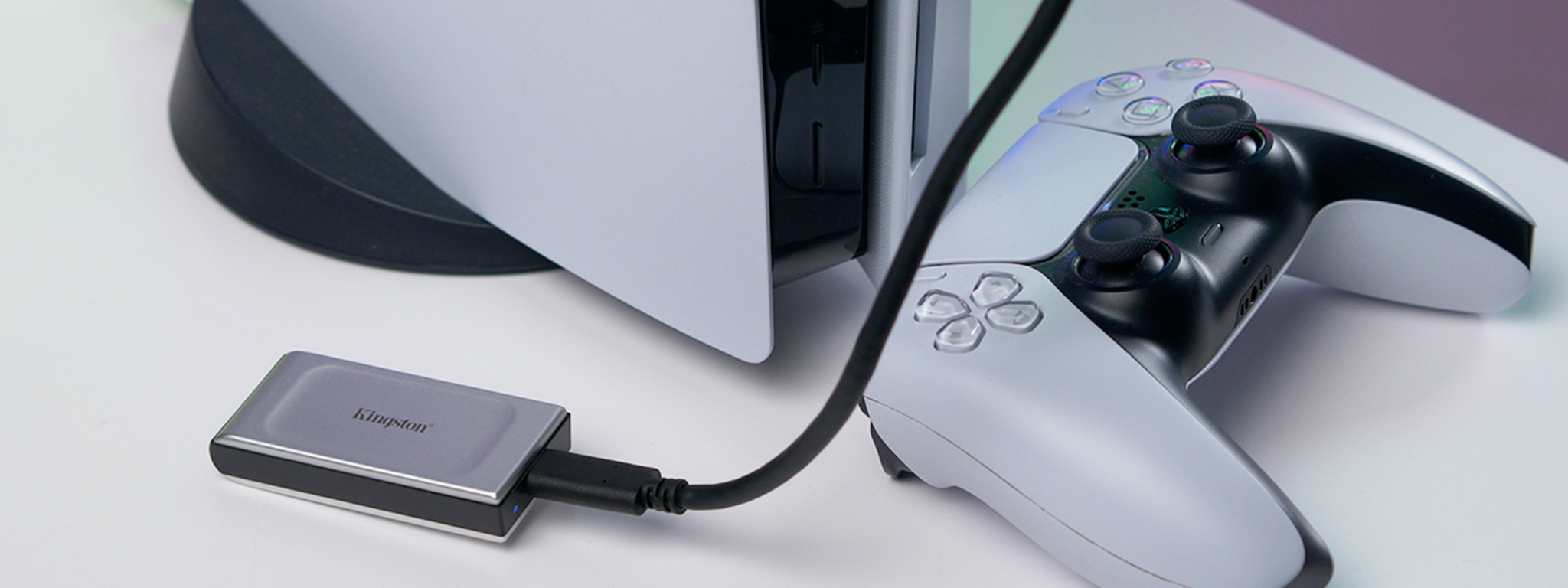
A common question for PlayStation 5 owners is can you play ps5 games on external ssd. With modern titles demanding massive storage space, the console’s built-in drive can quickly fill up, leaving gamers searching for alternatives. External SSDs offer speed, convenience, and extra capacity, but the PS5 has specific limitations on how they can be used.
In this article, “PS5 Storage Explained: Can You Play PS5 Games on External SSD?”, we’ll break down what works, what doesn’t, and the best ways to expand your storage without sacrificing performance.
Understanding the PS5 Storage System
The PlayStation 5 (PS5) uses a custom NVMe SSD, which is a super-fast storage system that makes games load quickly, runs gameplay smoothly, and creates more immersive experiences.
The PS5 has an 825GB internal SSD, with about 667GB available for games and apps. It can read data at speeds up to 5.5GB per second, letting games load huge worlds, textures, and assets almost instantly. This speed eliminates long loading screens and allows developers to create richer, more dynamic game worlds.
The PS5’s storage system is also flexible and expandable. You can increase your storage capacity in two main ways:
- 2 SSD Expansion Slot: You can install a compatible M.2 NVMe SSD inside the PS5 to play PS5 games directly from it, just like the built-in drive.
- External USB Drives: You can connect external SSDs or HDDs via USB. While PS5 games cannot be played directly from these drives, they can be stored there to save internal space. PS4 games, however, can be both stored and played from an external SSD.
The PS5’s storage system is designed for speed, efficiency, and flexibility. It balances ultra-fast performance for next-gen gaming with practical storage expansion options, giving players the freedom to manage their game library easily while enjoying a seamless gaming experience.
Can You Play PS5 Games on an External SSD?
The short answer is no, you can’t play PS5 games directly from an external SSD.
PS5 games are made to work with the console’s super-fast internal NVMe SSD. This special storage can read and write data at speeds up to 5.5 GB per second, which is needed for smooth graphics, instant loading, and quick world changes in next-gen games.
External SSDs use a USB connection, which is much slower. Because of this, PS5 games can’t run properly if you try to play them straight from an external SSD.
However, you can still use an external SSD for storage. Here’s how:
- Store PS5 games: Move games you’re not playing to an external SSD to free up space on the internal drive.
- Transfer when ready: To play a game from an external SSD, first move it back to the PS5’s internal or M.2 SSD.
- Play PS4 games directly: PS4 games can be played straight from an external SSD, offering faster load times and smoother performance compared to traditional hard drives.
You can’t play PS5 games directly from an external SSD, but you can store them there. To play at full speed, PS5 games must run from the internal SSD or a compatible M.2 SSD inside the console.
Benefits of Using an External SSD with PS5
Using an external SSD with your PS5 offers several practical advantages that can improve your gaming experience and make managing storage much easier:
- More Storage Space
The PS5’s internal SSD is limited, which fills up quickly. An external SSD gives extra space for PS4 games, PS5 backups, updates, and media, so you don’t have to delete games as often.
- Faster Load Times for PS4 Games
PS4 games run much faster from an external SSD than from a regular hard drive. Levels load quicker, and gameplay feels smoother.
- Easy Game Management
You can quickly move games between your PS5’s internal and external SSDs. Store PS5 games externally when not in use and transfer them back when ready to play, saving time and avoiding re-downloads.
- Better Performance and Flexibility
Keep main PS5 games on the internal SSD and less-played ones on an external drive. This helps manage space efficiently without slowing down your console.
- Portability
External SSDs are small, light, and durable. You can take them to another PS5 and access your games or data instantly.
- Affordable Upgrade
External SSDs are a cheaper and easier way to expand your PS5 storage compared to installing an internal M.2 SSD.
An external SSD boosts storage, speed, and convenience for your PS5.
Recommended Setup for Best Results
To get the best performance and storage on your PS5, use a combination of internal, M.2, and external SSDs. Each has a specific role:
- Internal SSD for PS5 Games
Always play PS5 games from the internal SSD. It’s super-fast, giving smooth performance, instant loading, and high-quality graphics.
- 2 SSD for Extra PS5 Storage
You can install an M.2 SSD in your PS5 to increase storage. An M.2 SSD allows you to store and play PS5 games like the internal SSD, keeping your console fast.
- External SSD for Storage and PS4 Games
Use an external USB 3.0+ SSD to store:
- PS5 games for backup, not for direct play.
- PS4 games, which can be played directly.
- Media files like screenshots and videos.
- Keep Games Organized
Store your favorite PS5 games on the internal or M.2 SSD, and move older or less-played games to an external SSD. This keeps your console running fast and makes it easier to find your games.
- Use Quality Drives and Cables
Use fast, reliable SSDs and USB 3.0+ cables for optimal performance.
This setup provides speed, storage, and easy game access for a smooth PS5 experience.
Common Misconceptions
There are some common myths about using external SSDs with the PS5. Clearing them up helps avoid confusion.
Myth 1: External SSDs make PS5 games load faster.
False. Only the internal SSD or a compatible M.2 SSD can speed up PS5 games. External SSDs use USB, which is much slower and can’t match the high speeds needed for next-gen gameplay.
Myth 2: You can upgrade PS5 performance with an external SSD.
False. External SSDs don’t make your PS5 faster or improve graphics. They only provide extra storage for games, backups, and media.
The Truth:
External SSDs are useful for storing PS5 games and for playing PS4 games faster. But PS5 games must run from the internal or M.2 SSD to get full speed and performance.
External SSDs are valuable for storage and convenience, but they don’t boost gameplay performance for PS5 games.
Final Thoughts: PS5 Storage and External SSDs
You cannot play PS5 games directly from an external SSD. Only the PS5’s ultra-fast internal NVMe SSD or a compatible M.2 SSD provides the speed needed for instant loading, smooth gameplay, and detailed game worlds.
However, external SSDs are still very useful. You can use them to:
- Store PS5 games until you’re ready to play.
- Play PS4 games faster.
- Keep your game library organized without deleting or re-downloading.
Recommended Setup
- Keep your active PS5 games on the internal SSD or M.2 expansion
- Use an external SSD for PS4 games, backups, and extra storage
This setup provides speed, extra storage, and easy game management for a smooth PS5 experience.